Jump to content
View in the app

A better way to browse. Learn more.

KH13 · for Kingdom Hearts

A full-screen app on your home screen with push notifications, badges and more.

To install this app on iOS and iPadOS
  1. Tap the Share icon in Safari
  2. Scroll the menu and tap Add to Home Screen.
  3. Tap Add in the top-right corner.
To install this app on Android
  1. Tap the 3-dot menu (⋮) in the top-right corner of the browser.
  2. Tap Add to Home screen or Install app.
  3. Confirm by tapping Install.

yellomello

Verified Member
  • Joined

  • Last visited

Everything posted by yellomello

  1. whatup...thanx for adding me as a friend...
  2. hah..a fellow newbie..wasup...hellsing? dope.
  3. never mind...figured it out... check it out on the images forum.
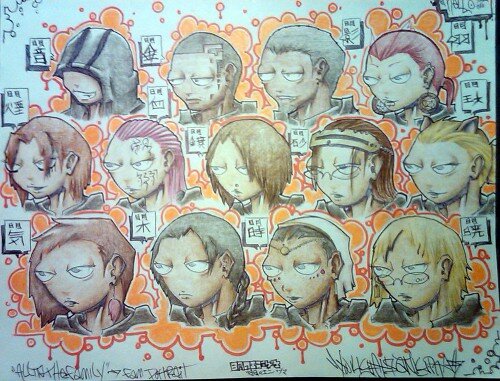
  4. it's my organization...deformed style...from left to right, top to bottom,...oto, kane, kage, hao, kina, suki, miyabi, sachi, sana, maya, boku, ji, aka
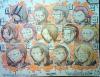
  5. it's my keyblade from my kh fancomic, angeldust, and at the bottom is my organization's number 4, Hao...more on it all when i get some sleep...
  6. i want to post my kh art..how...?
  7. yea, so...got a job designing tattoos and what not, awesome...
  8. check out my art, check out my art, check out my art....
  9. What's good, D_D_XIII...we're kinda like roxas and xion...newer members in this organization....sry for comparing you to xion...you can be axel....yea..axel...
  10. What's good, fellow KH addicts. I'm Mello, and i found this site watching some of the vids that this place had posted on youtube. I'm an artist, specializing in Tattoo, Graffiti, Graphic Design and Illustration. Hopefully i get to post some of my artwork here, but if you wanna see my work, thtere are plenty of places....yelloemello.deviantart.com, www.theotaku.com/yellomello, and www.facebook.com/melloart. This looks like a fun place, hopefully i have a good time...

Configure browser push notifications

Chrome (Android)
  1. Tap the lock icon next to the address bar.
  2. Tap Permissions → Notifications.
  3. Adjust your preference.
Chrome (Desktop)
  1. Click the padlock icon in the address bar.
  2. Select Site settings.
  3. Find Notifications and adjust your preference.
Scroll to the top