




Jump to content
View in the app

A better way to browse. Learn more.

KH13 · for Kingdom Hearts

A full-screen app on your home screen with push notifications, badges and more.

To install this app on iOS and iPadOS
  1. Tap the Share icon in Safari
  2. Scroll the menu and tap Add to Home Screen.
  3. Tap Add in the top-right corner.
To install this app on Android
  1. Tap the 3-dot menu (⋮) in the top-right corner of the browser.
  2. Tap Add to Home screen or Install app.
  3. Confirm by tapping Install.

Kirito (SAO)

Member
  • Joined

  • Last visited

About Me

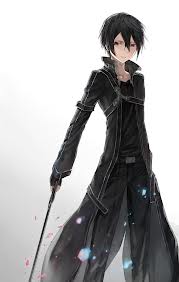
Hello, im Kirito

Age: 16

Class: Swordsman

Weapon: Sword

Skills: Has a lot, but one of them is duel blade

Status: Single and ready to mingle

Sex: Male

Hobbies: Kill monsters

Clan: Isnt in one

Style: Always where black clothing

Anime: Sword Art Online

Chat with me, if you want :D

Configure browser push notifications

Chrome (Android)
  1. Tap the lock icon next to the address bar.
  2. Tap Permissions → Notifications.
  3. Adjust your preference.
Chrome (Desktop)
  1. Click the padlock icon in the address bar.
  2. Select Site settings.
  3. Find Notifications and adjust your preference.
Scroll to the top
