




Jump to content
View in the app

A better way to browse. Learn more.

KH13 · for Kingdom Hearts

A full-screen app on your home screen with push notifications, badges and more.

To install this app on iOS and iPadOS
  1. Tap the Share icon in Safari
  2. Scroll the menu and tap Add to Home Screen.
  3. Tap Add in the top-right corner.
To install this app on Android
  1. Tap the 3-dot menu (⋮) in the top-right corner of the browser.
  2. Tap Add to Home screen or Install app.
  3. Confirm by tapping Install.

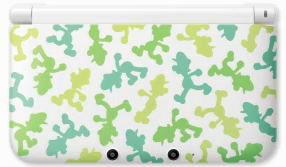
For the Year Of Luigi a special 3DSXL will be released

Posted

Posted Image


Japan will be getting yet another Nintendo 3DS XL design. During today’s Japanese Nintendo Direct, Nintendo gave us a first look at the new, Luigi-themed Nintendo 3DS XL, which is shown in the picture above. Considering that this year’s the “Year of Luigi,” let’s hope the new design arrives in the West.
 
I want this outside of Japan actually. So much.

Featured Replies

Looks more like some weird snow camoflage or something to me. lolI would buy one if it was just a green 3DS with a big-ass "L" printed on it, though.

Join the conversation

You can post now and register later. If you have an account, sign in now to post with your account.

Guest
Reply to this topic...

Configure browser push notifications

Chrome (Android)
  1. Tap the lock icon next to the address bar.
  2. Tap Permissions → Notifications.
  3. Adjust your preference.
Chrome (Desktop)
  1. Click the padlock icon in the address bar.
  2. Select Site settings.
  3. Find Notifications and adjust your preference.
Scroll to the top