I'm astonished by this marvelous ArtWork, Square Enix never stops to impress me Hence, as soon as I saw the ArtWork, I started to work on my new Desktop background! This is what I came up with, hope you like it (no you're not drunk, I've got dual screen ) :Wallpaper version:Desktop screenshot version:Sorry for low quality but the max single file size has decreased dramatically :I decided to make sort of a Kingdom Hearts collage. At the left I used the cover ArtWorks for each title, Final Mixes/Remakes included. For Kingdom Hearts Dream Drop Distance and Kingdom Hearts III I used both versions of the ArtWork and the Logo respectively; Kingdom Hearts X[chi] is there too Initially I wanted to make a timeline, hence Kingdom Hearts Birth By Sleep and Birth By Sleep Final Mix should have been the first, but I wanted original versions and Final Mixes/Remakes to stick together and a timeline disposition would have phase shifted with 358/2 days being alone, so I decided to put it near Kingdom Hearts X[chi], the other lonely, in the last row, and I gave up the idea of the timeline At the right I used the HD ReMIXes ArtWorks, though I'm hoping in an higher resolution release for the 2.5 version (I'll have to adjust the image again with the HD version but hey, it's totally worth it ).






I'm astonished by this marvelous ArtWork, Square Enix never stops to impress me Hence, as soon as I saw the ArtWork, I started to work on my new Desktop background! This is what I came up with, hope you like it (no you're not drunk, I've got dual screen
  ) :Wallpaper version:
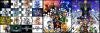 Desktop screenshot version:
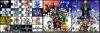 Sorry for low quality but the max single file size has decreased dramatically :I decided to make sort of a Kingdom Hearts collage. At the left I used the cover ArtWorks for each title, Final Mixes/Remakes included. For Kingdom Hearts Dream Drop Distance and Kingdom Hearts III I used both versions of the ArtWork and the Logo respectively; Kingdom Hearts X[chi] is there too
  Initially I wanted to make a timeline, hence Kingdom Hearts Birth By Sleep and Birth By Sleep Final Mix should have been the first, but I wanted original versions and Final Mixes/Remakes to stick together and a timeline disposition would have phase shifted with 358/2 days being alone, so I decided to put it near Kingdom Hearts X[chi], the other lonely, in the last row, and I gave up the idea of the timeline
  At the right I used the HD ReMIXes ArtWorks, though I'm hoping in an higher resolution release for the 2.5 version (I'll have to adjust the image again with the HD version but hey, it's totally worth it
  ).
).