




Jump to content
View in the app

A better way to browse. Learn more.

KH13 · for Kingdom Hearts

A full-screen app on your home screen with push notifications, badges and more.

To install this app on iOS and iPadOS
  1. Tap the Share icon in Safari
  2. Scroll the menu and tap Add to Home Screen.
  3. Tap Add in the top-right corner.
To install this app on Android
  1. Tap the 3-dot menu (⋮) in the top-right corner of the browser.
  2. Tap Add to Home screen or Install app.
  3. Confirm by tapping Install.
Posted
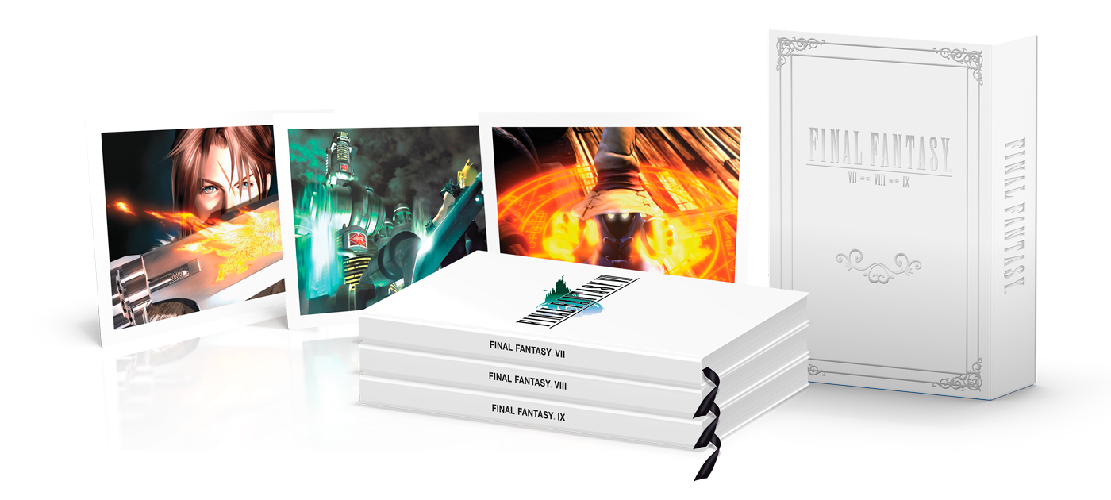
The must-have guide collection for any Final Fantasy fan, with books housed in a collectible slipcase and held closed by a magnetic clasp.
 
This set includes hardcover guides for Final Fantasy VII, Final Fantasy VIII and Final Fantasy IX, each with a deluxe ribbon bookmark.
 
Each guide has been redesigned and updated with new content and high resolution screen shots. In addition, the set comes with three iconic game images printed for the first time as high quality lithographs.
 
Includes three high quality lithograph prints that are secured in a Final Fantasy themed envelope.
 
Posted Image
 
Pre-order here

Featured Replies

Join the conversation

You can post now and register later. If you have an account, sign in now to post with your account.

Guest
Reply to this topic...

Configure browser push notifications

Chrome (Android)
  1. Tap the lock icon next to the address bar.
  2. Tap Permissions → Notifications.
  3. Adjust your preference.
Chrome (Desktop)
  1. Click the padlock icon in the address bar.
  2. Select Site settings.
  3. Find Notifications and adjust your preference.
Scroll to the top

