Jump to content
View in the app

A better way to browse. Learn more.

KH13 · for Kingdom Hearts

A full-screen app on your home screen with push notifications, badges and more.

To install this app on iOS and iPadOS
  1. Tap the Share icon in Safari
  2. Scroll the menu and tap Add to Home Screen.
  3. Tap Add in the top-right corner.
To install this app on Android
  1. Tap the 3-dot menu (⋮) in the top-right corner of the browser.
  2. Tap Add to Home screen or Install app.
  3. Confirm by tapping Install.

Diego Nuñez Icaza

Member
  • Joined

  • Last visited

Everything posted by Diego Nuñez Icaza

  1. Me in Unchained x!!! I joined Organization XIII!!!
  2. Here is my ID, add me in the party, and please add my sister, her ID is 39258please
  3. But the Limit form's Mirror says "An image of you obtaining old powers flows into your mind" in Kingdom Hearts HD 2.5 ReMIX
  4. Obviously Aqua, her fights against Ventus-Vanitas, Terra-Xehanort and the SECRET EPISODE!!!!
  5. For me, Vexen, Luxord and Xaldin, stupid Anti-Form, stupid button timing that I never get, and Stupid Xaldin`s Speed
  6. Do you play Kingdom Hearts X [chi]???
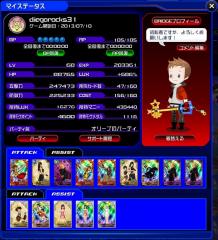
  7. I´m diegorocks31 from the Vulpeus Union, playing form Mexico!!! just wanted to say, I don´t know why My Stats

Configure browser push notifications

Chrome (Android)
  1. Tap the lock icon next to the address bar.
  2. Tap Permissions → Notifications.
  3. Adjust your preference.
Chrome (Desktop)
  1. Click the padlock icon in the address bar.
  2. Select Site settings.
  3. Find Notifications and adjust your preference.
Scroll to the top