Jump to content
View in the app

A better way to browse. Learn more.

KH13 · for Kingdom Hearts

A full-screen app on your home screen with push notifications, badges and more.

To install this app on iOS and iPadOS
  1. Tap the Share icon in Safari
  2. Scroll the menu and tap Add to Home Screen.
  3. Tap Add in the top-right corner.
To install this app on Android
  1. Tap the 3-dot menu (⋮) in the top-right corner of the browser.
  2. Tap Add to Home screen or Install app.
  3. Confirm by tapping Install.

All Activity

This stream auto-updates

  1. Past hour
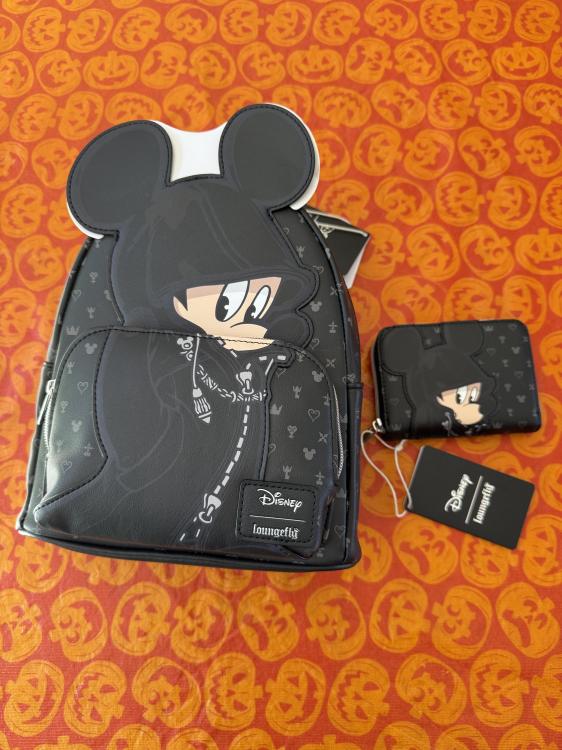
  2. Got this set thanks to my amazing husband @Queen Tery calling around, tracking them down, and driving over an hour to get them for me! 😭 ❤️
  3. Yeah it was the intern’s contribution to the project
  4. not actually anything relevant
  5. wasnt that just a fun easter egg
  6. Today
  7. https://klipy.com/gifs/67-67-school
  8. SIH SEVENNN!!!!
  9. UHUHUAHAHHAHAHAHAHA
  10. https://klipy.com/gifs/stan-twitter-reaction-meme-9
  11. Ban this guy
  12. nah bro im 19 and i got my whimsy back last year fuck that high school lmfao
  13. i wasnt melancholic i was just slowly losing my mind
  14. i just went to a pressure cooker high school lol
  15. Yesterday
  16. Tenor GIF
  17. I think 16-17 is just typically the age where a of folks reach a turning point
  18. Like when I was that age it was very up and down- some days good some bad, some terrible as shit lmao you know?
  19. I don't know about that- I don't think 16-17 always results in just melancholic all the time
  20. Like I was only a silly billy 14-15 I feel 16-17 I was just burnt out lmao
  21. Tbh maybe I’m projecting but he seems too whimsical to be 16
  22. Chadley final boss? Oh goody...
  23. Sora will most likely be in next update of FN on the 3rd
  24. Sorry i meant 16
  25. cause otherwise you're suggesting a 2 year jump from kh2 to kh3
  26. ... like by the end of limit cut you mean?
  27. Why do they never flinch 😭
  28. The Nobodies in 3 are bullshit

Configure browser push notifications

Chrome (Android)
  1. Tap the lock icon next to the address bar.
  2. Tap Permissions → Notifications.
  3. Adjust your preference.
Chrome (Desktop)
  1. Click the padlock icon in the address bar.
  2. Select Site settings.
  3. Find Notifications and adjust your preference.
Scroll to the top