



Jump to content
View in the app

A better way to browse. Learn more.

KH13 · for Kingdom Hearts

A full-screen app on your home screen with push notifications, badges and more.

To install this app on iOS and iPadOS
  1. Tap the Share icon in Safari
  2. Scroll the menu and tap Add to Home Screen.
  3. Tap Add in the top-right corner.
To install this app on Android
  1. Tap the 3-dot menu (⋮) in the top-right corner of the browser.
  2. Tap Add to Home screen or Install app.
  3. Confirm by tapping Install.

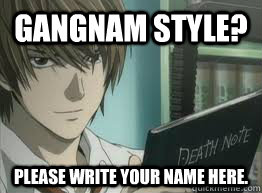
What Kira thinks about all the Gangnam style

Featured Replies

  • Author

Hey guys

I think

I think -iAD likes DeathNote

Just a thought :)


Hey, you think? It's not very obvious, is it? /cardiac arrest

Looks like a Dead End to me ;)


(heh heh....see I used a Mirai Nikki reference. Get cause I- Oh forget it...)

LOL L! That picture made my day.

Dang. That's hardcore. Even for Kira.
  • Author

Dang. That's hardcore. Even for Kira.


10:09 Am

Light watches the news.

"And this raepist-serial killer's name is-"

*COMMERCIAL*

"OPPAN GANGNAM STYLE!"

Light: fking Psy.

Configure browser push notifications

Chrome (Android)
  1. Tap the lock icon next to the address bar.
  2. Tap Permissions → Notifications.
  3. Adjust your preference.
Chrome (Desktop)
  1. Click the padlock icon in the address bar.
  2. Select Site settings.
  3. Find Notifications and adjust your preference.
Scroll to the top

