Jump to content
View in the app

A better way to browse. Learn more.

KH13 · for Kingdom Hearts

A full-screen app on your home screen with push notifications, badges and more.

To install this app on iOS and iPadOS
  1. Tap the Share icon in Safari
  2. Scroll the menu and tap Add to Home Screen.
  3. Tap Add in the top-right corner.
To install this app on Android
  1. Tap the 3-dot menu (⋮) in the top-right corner of the browser.
  2. Tap Add to Home screen or Install app.
  3. Confirm by tapping Install.
Posted

post-50865-0-19466500-1423249264_thumb.png

Featured Replies

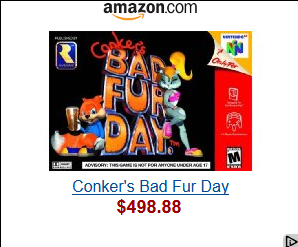
I can see it. Conker's Bad Fur Day is a cult classic, and copies of the game are exceedingly rare (hee) and hard to find. Especially if its still in its original box and possibly remains unopened.

If that's a surprise, you haven't seen EarthBound prices for boxed copies...

Ah, good game....good game...I would say bring this series back, but I think our world is way too politically correct for gems like these anymore.


Configure browser push notifications

Chrome (Android)
  1. Tap the lock icon next to the address bar.
  2. Tap Permissions → Notifications.
  3. Adjust your preference.
Chrome (Desktop)
  1. Click the padlock icon in the address bar.
  2. Select Site settings.
  3. Find Notifications and adjust your preference.
Scroll to the top