Demyx Xymed
Verified Member
-
Joined
-
Last visited
Everything posted by Demyx Xymed
-
 slaps with a glass of water
 -
-
banned because i have no reason to ban you.
-
Random Dancing Chicken! *chicken eats all of you, while doing the macarena*
-
yeah, i accidently deleted the image after posting, so i had to go back and put it back.
-
-
okay... interesting, i guess, but i was talking more about the comic that came with the game.
-
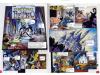
that means the sceptre and the kingdom in spanish. Anywho, that was the title of a short comic released with the first kingdom hearts in spain. I didn't see it in the galleries, so i was wondering if you wanted my translated scans of it? an example:
-
re:coded was a fun game. i just hated the camera controls.
-
This thread made me feel like punching babies. So i did. I then went to a diner for waffles.
-
-
-
Dance Water, Dance! *the world floods*
-
-
banned because no one will ever bow to you
-
try fotoflexer. its an online photo editing site.
-
North Dakota, then he stole
-
wish granted, but it can only hover over dumps i wish for a new guitar
-
BaNNED for wtf are you talking about?
-
........ 1563
-
-
-
-
-
-82, because no one tells me what to do. plus, i hate number scales. and lolololol.