Jump to content
View in the app

A better way to browse. Learn more.

KH13 · for Kingdom Hearts

A full-screen app on your home screen with push notifications, badges and more.

To install this app on iOS and iPadOS
  1. Tap the Share icon in Safari
  2. Scroll the menu and tap Add to Home Screen.
  3. Tap Add in the top-right corner.
To install this app on Android
  1. Tap the 3-dot menu (⋮) in the top-right corner of the browser.
  2. Tap Add to Home screen or Install app.
  3. Confirm by tapping Install.

venxas24

Verified Member
  • Joined

  • Last visited

  1. venxas24 posted a status update

    Just watched Warm Bodies, and it was better than I thought it would be

    Shulk replied

    Warm Bodies was hilarious. xD

  2. venxas24 posted a status update

    Hey, Kool-Aid Man

    Philip Ellwell replied

    Oh yeeeeeeeeeaaah!!!

  3. venxas24 posted a status update

    Donphan. AKA Dragon slayer

  4. venxas24 posted a status update

    What kind of clothes melt when you go inside? a snow suit

  5. venxas24 posted a status update

    Donphan are awesome

  6. venxas24 posted a status update

    Time for some good ole Guitar Hero II

  7. venxas24 posted a status update

    Manatees are pretty freakin awesome

  8. venxas24 posted a status update

    What do you call a snail on a ship? A Snailor XDD

  9. venxas24 posted a status update

    I put a Spiritomb on the GTS asking for a ditto from another language and I got one. And it was shiny. My life is made

    I once traded a Cressila for a Shiny Sandslash.


    No regrets.

    user1 replied

    i got a rock

  10. venxas24 posted a status update

    You remind me of the babe

    venxas24 replied
    xD when did that happen?
    Lalalablah replied

    Yesterday we all decided to do that from the chatroom lol

  11. venxas24 posted a status update

    My room hasn't been this clean in a fort night

  12. venxas24 posted a status update

    How would you speak to that ho-o-o-orse, ho-o-o-o-orse?

    xoblivionx13 replied

    I've heard by mo-o-o-o-orse is the best way.

  13. venxas24 posted a status update

    Mewtwo Strikes Back is such a good movie

    Shulk replied

    It ties with the second Pokemon movie for my favorite. Both are too good for me to choose an absolute favorite.

  14. venxas24 posted a status update

    "I didn't know Vikings existed anymore." "They mostly live in Minnesota."

    Varnish replied

    I would like to consult the moron who thought that including that line in the film was a good idea...

  15. venxas24 posted a status update

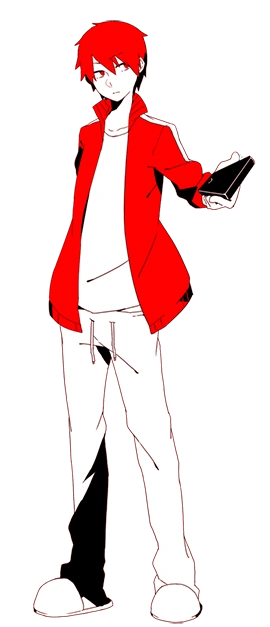
    I've never changed my profile picture I wonder if I should

    Light Guardian replied

    red eyes, hmmm....

    Enmaa replied

    The main characters in the series have red eyes. http://images3.wikia.nocookie.net/__cb20130102022244/kagerouproject/images/e/e3/Shintaro.png <--- that's his full attire, but it's just figurative as his jacket is red with white stripes. This is how he actually looks http://data2.whicdn.com/images/60608918/large.gif

    Light Guardian replied

    OH ok.

    (sorry for making your webpage full of usless comments venxas24)

    feel free to erase them. :D

  16. venxas24 posted a status update

    Just battled my friend in a Single, Double, Triple, and Rotation battle. He won the single I won the rest

    BlackAceZero777 replied

    That must've been epic...I can't wait to get Pokemon X...

  17. venxas24 posted a status update

    The scientific term for viagra is Mycoxafailin

    Enmaa replied

    emphasis on cox and fail

    I wish i could like this because i have nothing really to contribute but thats hysterical

  18. venxas24 posted a status update

    You and me baby making love like gorillas

  19. venxas24 posted a status update

    I could play Pokemon X forever

    Xiro replied

    @SoraBlade Rick hits HARD

    SoraBlade replied

    Okay then. Bye.

    Shulk replied

    Uh... Oh yeah, Pokemon... That's what this was about, wasn't it?

  20. venxas24 posted a status update

    Just sweeped my friend in XY. It was hecka epic

Configure browser push notifications

Chrome (Android)
  1. Tap the lock icon next to the address bar.
  2. Tap Permissions → Notifications.
  3. Adjust your preference.
Chrome (Desktop)
  1. Click the padlock icon in the address bar.
  2. Select Site settings.
  3. Find Notifications and adjust your preference.
Scroll to the top