Official Bowtie Artist
Verified Member
-
Joined
-
Last visited
-
 This is as far as I got for deciphering the book text in the trailer. Could end up being a Caesar Cipher + scramble. First line: xx xxx xx xxxxx Second line: xxxxx xxx xxxx OR xxx xx xxx xxxx The major hangup at the beginning was that the last letter on both lines get overlaid with two other letters, frame-by-frame. So had to take my time.
 -
Hey y'all! SuperOfTheInBetween here! No no...wait....Doctor Artist back at it again! Nope, wait...wrong one...HELLO THERE! Official Bowtie Artist, here again after all these years! What? It...it's only been like three years? ...Oh. Well...uh. Heya!
-
Official Bowtie Artist changed their profile photo
-
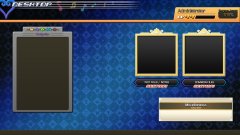 Hey everyone, I'm back again with a brand new wallpaper! I just finished Melody of Memory, and boy are my fingies tired! No, seriously...Proud Mode...whew. But seriously though, I was excited to make a new piece since my last two (I uploaded recently, but I made those about eight months ago). So here you go! Feel free to use!
 -
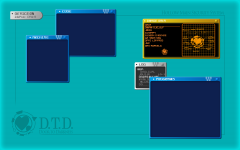 Hey everyone! Here's another recreated menu design, this time Ansem's Hollow Bastion OS from Kingdom Hearts 2. My first one, designed after the version in KH3 (mainly used by Ienzo if y'all don't remember) inspired me to push further down this road. I can definitely say that I'm excited to see what else I can work with. SO...next one up: wallpapers inspired by other menus found within Kingdom Hearts games! I'm currently working on one based loosely off of the Melody of Memory "Museum" menu, obviously going off of screenshots publicly revealed to us through the official website so as to avoid spoilers myself as well as avoid giving out any accidentally. Anyways, look forward to that one, as it should be finished here within this evening. There will also be a Google Drive folder made to hold all the different backgrounds, once I've made enough that is. Anyways, hope you enjoy! (oh, and devs, by technical terms this counts as fan art, as none of the backgrounds I'm making are official or taken from game files. They're all made from scratch through Photoshop. Even so, if this needs to be posted elsewhere, please let me know. I'll be happy to work with you guys on this.)
 -
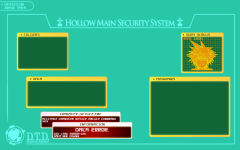 Hey everyone! It has been a SUPER long while! What am I here with today? No no, not one of the regular KH portraits I used to do...but wallpapers you can use on your computer! I've been working with Photoshop for a long time due to working on my own video game. One day I just thought to myself, "huh, you know, I wonder...what if I could make desktop backgrounds too?" So there I am, thinking. "Well, shucks, I love me some Kingdom Hearts. What was that whole Hollow Bastion OS system that Ansem used on his computer?" And that's where it struck me. Why not recreate some menu designs from SCRATCH to use on a computer? So here we are, people, Ansem's Hollow Bastion OS menu from KH3. I'll put up KH2's as well here in a second.
 -
-
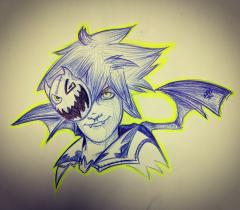 Happy Halloween everyone! Sorry I haven't posted a new KH picture in a whike, I've been working on art for my own video game and stuff. Busy busy! Hopefully I'll have some other stuff soon, planning a Naminé, a Larxene, and a Dark Riku soon! Stay safe, stay awesome!
 -
-
-
-
-
-
-
-
-
-
-
I'm actually REALLY digging this. Keep it up, mate! I'd love to read all of this!
-
-
-
I haven't updated my profile since December...hmmm...when I wake up, I shall have to change that.
-
-
I mean, it COULD be possible, seeing how the menu for KH 0.2 looked. It follows a similar pattern...ish. Heh. We'll all have to see, won't we? Either way, doesn't look half bad!
-
-
-
-
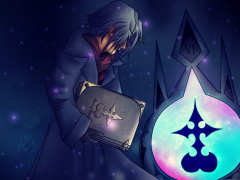 This is a new art piece based on an old piece from 2014. Thought I'd see what I can do now that i couldn't do back then. HUGE difference! If anyone's interested, check out the old piece, then look back at this. Look at the huge difference! ORIGINAL PIECE http://thedoctorartist.deviantart.com/art/The-Organization-s-Consultant-449981805 2017 PIECE: http://thedoctorartist.deviantart.com/art/Zexion-Remastered-677508251