SoraUltimateKeybladeMaster
Verified Member
-
Joined
-
Last visited
Everything posted by SoraUltimateKeybladeMaster
-
 if you had to battle a giant bass ( under some kind of circumstance) would you be able to do it?
 -
*suddenly giant fish*
-
Thanks guys! It took me a while to draw this.
-
That's amazing artwork. I love this!
-
-
You're welcome!
-
Here's my submission: http://kh13.com/forum/topic/102655-entry-for-28-giveaway/
-
This is cute! It looks great. I love it!
-
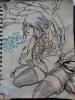
This is the picture I drew of Aqua. Sorry the paper's s little crinkled. It hard to live with three other kids. Anyway, I hope you guys like it.
-
I love this video. I haven't seen for a few years now though.
-
-
This just made my day!
-
That was wonderful!
-
Happy Birthday! I hope you day is wonderfully filled with birthday wishes!
-
Can you please stop looking awesome?! This is one of the best cosplays that I have ever seen! Great Job!
-
If you really think long and hard about it, I'm sure that you'd come up with the answer. Everyone knows who would win, right? ...Except for me...
-
I've never been to WDW. It sounds like a lot of fun though.
-
This is cool. Probably better than what I can do.
-
Yeah, but I don't even have enough munny to even have stuff just lying around my house. Anyway, amazing cosplay. You look great
-
Photoshop images count, right?
-
I wish I had munny to cosplay... This is great! I love it!
-
Gotta love those pixels!
-
That's crazy! But cool.
-
-