SRKTVAMDGRLXN
Verified Member
-
Joined
-
Last visited
Everything posted by SRKTVAMDGRLXN
-
-
-
0.2 is pretty much the prologue of KH3. Demo is not (might not be) the right word to describe it.
-
You want this world in KH3?
-
-
-
???? Luxord?
-
Cinder = Killer Instinct?
-
No problem... ^_^
-
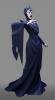
1) So, what do you guys think? Will the sea witch be back in KH3? She has already been killed 3 times, but always finds a way back and we saw in KH3D that Sora and Riku only defeated her, not really finished her. 2) Will Maleficent be a major threat again not only to Sora and company, but also to the worlds, just like KH1? 3) Could Mizrabel (from Castle of lllusion and Epic Mickey), who bears a striking resemblance to Maleficent, make an appearance in KH3, perhaps as an agent of the evil fairy herself or something like that? Leave here your opinions/thoughts, everybody... ^_^
-
^^ ^_^ No problem...
-
-
-
-
HAPPY BIRTHDAY, DUDE, best wishes always...
-
-
-
What do you mean?
-
At last, someone has figured it out...
-
Anyway, your choices (of worlds) are up to you and you only, obviously.
-
1) If what you said is correct, then that means KH3 will only come to America in 2018, right? 2) Nuff said... Years? And that's why it should be released WITH KH3, not separate from it.
-
Really? Just this?
-
Could be.
-
-