Jump to content
View in the app

A better way to browse. Learn more.

KH13 · for Kingdom Hearts

A full-screen app on your home screen with push notifications, badges and more.

To install this app on iOS and iPadOS
  1. Tap the Share icon in Safari
  2. Scroll the menu and tap Add to Home Screen.
  3. Tap Add in the top-right corner.
To install this app on Android
  1. Tap the 3-dot menu (⋮) in the top-right corner of the browser.
  2. Tap Add to Home screen or Install app.
  3. Confirm by tapping Install.
  • Replies 67
  • Views 2.4k
  • Created
  • Last Reply

Top Posters In This Topic

Featured Replies

The future?

yays

I love the "Lea to Axel and Heartless back to Lea" presentation. Lol

i love axel so much i hope we get to hear more about his life

finally i've been waiting for 2 days

um.... +_+; there will be translations,,, right?

um.... +_+; there will be translations,,, right?


We've already got some. Just waiting on the bulk of it.

yes lea is beak

theres gonna be a peagusus dream eater? cool

awesomesauce x3

yessssshhhhh!!!!!! LEA is Back

I must import the bundle! (>'o')>

This is gonna be sick.

The future?


DChiuch is that dedicated.

He goes into the future and collects news for us.


But seriously, how about some 3DS's and KH:DDD?

That's all?!? I wanted more! Like, maybe some of my worlds

Don't worry, more will come. First images is just a small portion of the full scan, while the three other images are from the Nomura Interview.

Chernabog!!

OMG it's the Chernabog, Fantasia world is going to be so awesome I'm really excited! :D

Um...maybe it's because I can't remember Fantasia at all, but I are those scenes with like a mountainous area with a rainbow and that garden with all the flowers also part of the Fantasia world, because I really can't tell.

skin tight lycra does not suit riku

The TRON Legacy world is looking awesome. >:D

This is so exciting! I need to get a copy of this *o*

CHERNABOG MY LIFE IS NOW COMPLETE

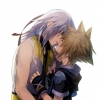
*gasp* Aaaawwwwwwwwww, Riku's smile!!!!!! >w

@Kishira Yeah, I smiled so much when I saw how happy and smiley he was :D

I LOVE LEA!!!!!!!!!!!!

Configure browser push notifications

Chrome (Android)
  1. Tap the lock icon next to the address bar.
  2. Tap Permissions → Notifications.
  3. Adjust your preference.
Chrome (Desktop)
  1. Click the padlock icon in the address bar.
  2. Select Site settings.
  3. Find Notifications and adjust your preference.
Scroll to the top