





Jump to content
View in the app

A better way to browse. Learn more.

KH13 · for Kingdom Hearts

A full-screen app on your home screen with push notifications, badges and more.

To install this app on iOS and iPadOS
  1. Tap the Share icon in Safari
  2. Scroll the menu and tap Add to Home Screen.
  3. Tap Add in the top-right corner.
To install this app on Android
  1. Tap the 3-dot menu (⋮) in the top-right corner of the browser.
  2. Tap Add to Home screen or Install app.
  3. Confirm by tapping Install.

User Feedback

Recommended Comments

Epheymer

Verified Member

I freakin' need that

Guest

Guest

Guests

TAKE MY FRICKIN MONEY!seasalty

Inçendyne

Verified Member

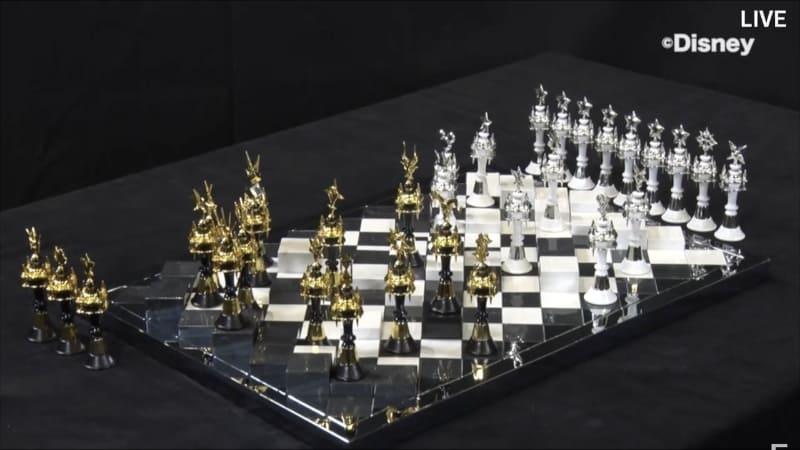
It even has the raised platforms for proper play of 4D Darkness Chess.

Noleen#7811

Verified Member

that looks extremely expensive

moon☁

Verified Member

It’s beautiful CJXKXKXK

doesn’t look functional. But it’s pretty

Movies798

Verified Member

I hope it has a booklet or something to tell us which chess piece is which. I know almost half of them, but there's still some chess piece I don't know which chess piece belongs to.

varxtis

Verified Member

I have no clue how to play chess, but Im gettin' me some KH 4D Chess.

Does anyone know of a pre-order link, or any dates?

And does anyone know if it'll play like regular chess except raised squares. I guess Im mainly asking about the chess pieces.

DestinysUnion

Verified Member

I'm curious how they're handling the pieces, since each side (in normal chess) uses 16 pieces. Will some of the Darknesses repeat? They're really confusing to look at from a distance. lol

For the light side, I see the pieces for Sora (crown), Riku (Heartless emblem), Kairi (star), Mickey (Mickey emblem), Terra (Ends of the Earth keychain), Aqua (Stormfall keychain), Ven (Wayward Wind keychain), and I think they've added Roxas and Lea in the far right corner? (Roxas' cross and Lea's keyblade keychain) And then numerous pieces for KHUx (the hollowed out star).

Ultima Spark

Verified Member
10 hours ago, Movies798 said:

I hope it has a booklet or something to tell us which chess piece is which. I know almost half of them, but there's still some chess piece I don't know which chess piece belongs to.

I think it's for decorative purposes, not an actual functioning chess set.

Movies798

Verified Member
(edited)
1 hour ago, Ultima Spark said:

I think it's for decorative purposes, not an actual functioning chess set.

Looks like a functioning chess set to me.

Edited by Movies798

SweetYetSalty

Verified Member

I want to see if they have every characters symbol on the chess board. I hope we get to see closeups of the pieces. That being said I have no idea how to play chess.

Otti#8624

Verified Member

Hah, the way the board here is set up there is no way to play chess on it

Maybe you can use the pieces to play it, but I don't think there's even enough to do that

It's definitely just gonna be a decoration

Epheymer

Verified Member

I'm sure Nomura actually made official rules for it, mark my words laughsinnomura

Otti#8624

Verified Member

That would be the greatest thing ever

Epheymer

Verified Member

I cannot be more obscure than the board game in Birth by Sleep

Otti#8624

Verified Member

Command board? That's just Monopoly

Epheymer

Verified Member

There's no prison sadly

ElectriCole

Verified Member

It's more like fortune street than monopoly

Inçendyne

Verified Member

In 4D Darkness Chess, you get sent to The Realm of Darkness instead.

Dagesh Lene

Verified Member

Does that mean we will finally find out the rules to this chess game?

Epheymer

Verified Member

I think the game's rules are easier to understand than the games' plot

Join the conversation

You can post now and register later. If you have an account, sign in now to post with your account.

Guest
Add a comment...

Configure browser push notifications

Chrome (Android)
  1. Tap the lock icon next to the address bar.
  2. Tap Permissions → Notifications.
  3. Adjust your preference.
Chrome (Desktop)
  1. Click the padlock icon in the address bar.
  2. Select Site settings.
  3. Find Notifications and adjust your preference.
Scroll to the top
